パスキーの仕様などを読んで無事頭でっかちになったため、パスキーの登録・認証を行うサンプルアプリを作ってみた。
http://github.com/TatsuyaYamamoto/passkeys-sample
ちなみに WebAuthn では登録・認証のプロセスを以下のように命名している。
- 公開鍵を作成してそれをユーザーに関連付けるプロセス 👉️
Registration Ceremony - 登録済みの公開鍵の秘密鍵をユーザーが管理していることを証明するプロセス 👉️
Authentication Ceremony
コンポーネント
登録・認証を実現するのに必要なコンポーネントは4つ。
- バックエンドのアプリケーションがパスキーの登録に必要なデータを作成したり、公開鍵を保存する。
- フロントエンドのアプリケーションがブラウザと通信したり、バックエンドへ公開鍵を送信する。
- ブラウザが WebAuthn API を介してフロントエンドと通信したり、CTAP2 を介してパスキープロバイダとやりとりする。
- パスキープロバイダ (たとえば Google パスワードマネージャー)がパスキーを作成したり、秘密鍵を保存する。
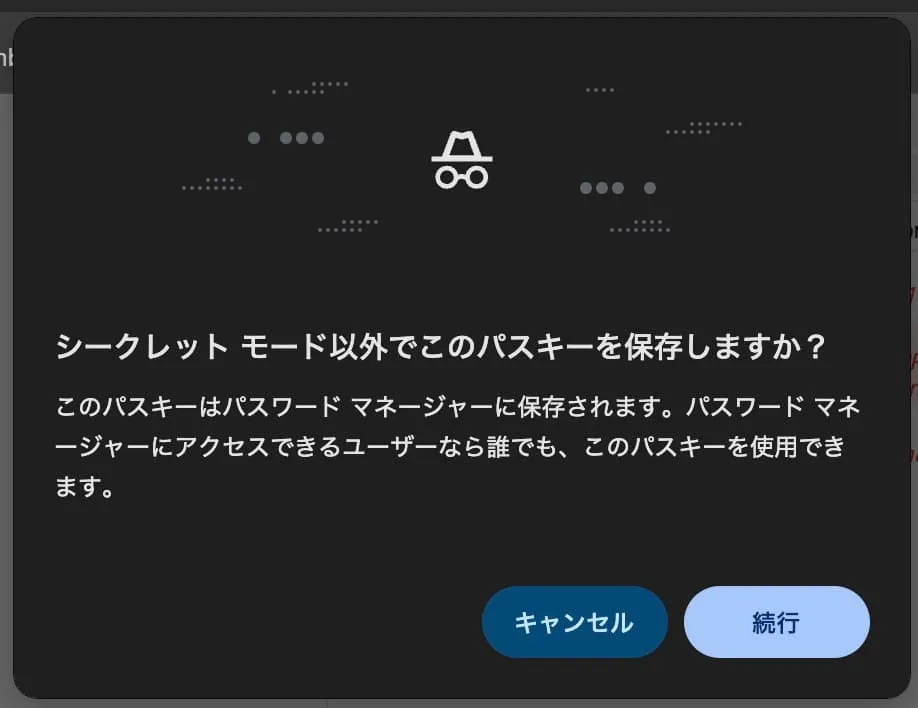
仮に Chrome のシークレットブラウザでパスキーを登録しようとすると、パスキープロバイダへのアクセスを求められる。
バックエンド・フロントエンドは web.dev でも紹介されている SimpleWebAuthn を使って実装する。
ArrayBuffer な値を WebAPI で使える Base64 に変換 (またはその逆) をしてくれたりと、
パスキーを登録する (Registration Ceremony)
フロントエンドが PublicKeyCredentialCreationOptions を要求する
Web アプリ上のボタンなどでパスキーの作成を開始する。
PublicKeyCredentialCreationOptions は仕様として定義されている型で、
WebAuthn を使って公開鍵を作成するために使う。
このサンプルではこのタイミングで userId を送信しているが、既にログインセッションがあって user が分かっている状態で開始するのが一般的だと思う。
const handleRegistration = async () => {
  const optionsJson = await postJson("/api/webauthn/registration/options", {
    userId,
  });
  // 省略
};
バックエンドが PublicKeyCredentialCreationOptions を返す
バックエンドは userId を元に generateRegistrationOptions() で PublicKeyCredentialCreationOptionsJSON を作る。
~JSON になっているのは、関数内部で作成された ArrayBuffer 型のプロパティを持つ PublicKeyCredentialCreationOptions を WebAPI で使える文字列に変換しているから。
challenge は WebAuthn の仕様に従ってバックエンドで保存しておく。
app.post("/api/webauthn/registration/options", async (c) => {
  const { userId } = await c.req.json<{ userId: string }>();

  const passKeys = passKeyTable.get(userId) ?? [];

  const options = await generateRegistrationOptions({
    rpName,
    rpID,
    // userHandle を固定することで、同じデバイスへの再登録時に古いパスキーが上書きされる
    // https://www.w3.org/TR/webauthn-3/#sctn-user-handle-privacy
    // It is RECOMMENDED to let the user handle be 64 random bytes
    // https://www.w3.org/TR/webauthn-3/#user-handle
    // a user handle is an identifier for a user account, specified by the Relying Party as user.id during registration
    // userID: crypto.getRandomValues(new Uint8Array(64)),
    userName: userId,
    attestationType: "none",
    excludeCredentials: passKeys.map((passkey) => ({
      id: passkey.id,
      transports: passkey.transports,
    })),
    authenticatorSelection: {
      residentKey: "preferred",
      userVerification: "preferred", // デフォルトは "preferred" です。
      authenticatorAttachment: "platform",
    },
    // W3C spec 推奨
    // https://developers.google.com/identity/passkeys/developer-guides/server-authentication?hl=en#create_the_challenge:~:text=The%20recommended%20default%20value%20is%205%20minutes
    // ブラウザが上書きしうる timeout
    // https://www.w3.org/TR/webauthn-3/#dom-publickeycredentialcreationoptions-timeout
    timeout: 300_000, // 5分
  });

  // チャレンジをセッションに保存する
  // 参考: https://developers.google.com/identity/passkeys/developer-guides/server-registration?hl=ja#example_code_create_credential_creation_options
  sessionMap.set(userId, {
    challenge: options.challenge,
  });

  return c.json(options);
});
ブラウザがパスキーを作成する
バックエンドから受け取った PublicKeyCredentialCreationOptionsJSON を startRegistration() に渡してパスキーを作成する。
startRegistration は内部で navigator.credentials.create() を呼んでおり、
この API が実際にモーダルダイアログを表示し、ユーザーの操作を待ち、新しいパスキーを作成する。
const handleRegistration = async () => {
  // (省略)
  let registrationResponse;
  try {
    registrationResponse = await startRegistration({
      optionsJSON: optionsJson, // 👈️ サーバーから受け取った options
    });
  } catch (e) {
    // (省略)
  }

  const verifiedResponse = await postJson("/api/webauthn/registration/verify", {
    userId,
    response: registrationResponse,
  });
  if (verifiedResponse.ok) {
    alert("登録成功。");
  }
};
エラーハンドリング
当然いくつかのエラーケースがあり、仕様としても定義されている。
面白い(?)のは InvalidStateError で、これは「デバイスにパスキーが既にある」ことを表現しており、サイトはこれをエラーとして扱うべきではない。
try {
  registrationResponse = await startRegistration({ optionsJSON });
} catch (e) {
  if (e instanceof Error) {
    console.error("[browser] registration options error: ", {
      ...e,
      message: e.message,
    });
  }

  if (e instanceof WebAuthnError) {
    if (e.code === "ERROR_AUTHENTICATOR_PREVIOUSLY_REGISTERED") {
      alert("この端末は登録済みです。");
      return;
    }
  }

  if (e instanceof WebAuthnError) {
    if (e.code === "ERROR_PASSTHROUGH_SEE_CAUSE_PROPERTY") {
      alert("キャンセルされました。");
      return;
    }
  }
  return;
}
バックエンドでパスキーを保存する
パスキーで認証する (Authentication Ceremony)
ブラウザが options を取得する
const handleAuthentication = async () => {
  const optionsJson = await postJson("/api/webauthn/authentication/options", {
    userId,
  });
  // (省略)
};
バックエンドが options を返す
ブラウザが送信する
const handleAuthentication = async () => {
  // 省略
  let authenticationResponse;
  try {
    authenticationResponse = await startAuthentication({
      optionsJSON: optionsJson, // 👈️ サーバーから受け取った options
    });
  } catch (e) {
    // (省略)
  }

  const verifiedResponse = await postJson(
    "/api/webauthn/authentication/verify",
    {
      userId,
      response: authenticationResponse,
    },
  );
};
エラーハンドリング
try {
  authenticationResponse = await startAuthentication({ optionsJSON });
} catch (e) {
  if (e instanceof WebAuthnError) {
    console.error("[browser] authentication verify error: ", {
      ...e,
      message: e.message,
    });
  }
  if (e instanceof WebAuthnError) {
    if (e.code === "ERROR_PASSTHROUGH_SEE_CAUSE_PROPERTY") {
      alert("キャンセルされました。");
      return;
    }
  }
  return;
}